


Series: The Practical Guide to Dimensionality Reduction
Part 4 of 4
Which Method Do You Actually Use?
By Cory Henn · April 2026 · No linear algebra required
If you've made it through Parts 1–3, you've got a solid conceptual handle on what dimensionality reduction is doing and why it matters. You know why your 20,000-gene dataset needs compression, how PCA finds the axes of greatest variance, and why t-SNE and UMAP exist to catch the nonlinear structure that PCA flattens out.
Now comes the part everyone actually wants: how do you choose?
The one question that drives everything
Before you pick a method, answer this: What are you trying to do with the output?
Not “what is my data?” — that matters too, but it's downstream. The primary question is what job this plot needs to do. Because dimensionality reduction is always a tool serving a purpose, and the right tool depends on the purpose.
There are really only four things you're ever trying to do:
- Explore — You have a new dataset and you're figuring out what's in it
- Communicate — You need a figure for a paper, a talk, or a collaborator
- Quantify — You need reduced dimensions as input to a downstream analysis (clustering, trajectory inference, a classifier)
- Diagnose — You're checking whether your data has problems (batch effects, technical artifacts, outliers)
If you're exploring a new dataset
Start with PCA. Always.
I know UMAP is more exciting and the clusters look cleaner. Do PCA first anyway. PCA gives you information that UMAP hides. A PCA plot where your samples all pile into a single blob tells you something important: that there is no strong linear structure in your data, or that your variation is dominated by something you did not expect (a technical effect, a covariate you forgot about, a batch issue). A UMAP of that same data might look beautiful, with gorgeous clusters, and lead you completely astray.
PCA is your sanity check. Run it. Look at the variance explained per component. If the first two PCs explain 50% of the variance, that's a healthy, information-rich dataset. If they explain 8%, your signal is spread thin across many weak axes, and that is worth knowing before you project into 2D.
The practical workflow for exploration
- Run PCA. Check the elbow plot. Check PC1 vs PC2, colored by everything you have (batch, condition, cell type, sample ID).
- If PCA shows structure: great, you already have something. Now run UMAP for a better-looking version.
- If PCA shows a blob: investigate before moving on. You might have a batch problem, or your feature selection needs work.
If you're making a figure for a paper or talk
Use UMAP. Full stop.
UMAP produces the clearest visual separation of distinct cell populations, it's fast enough to run on datasets of any reasonable size, and it is what reviewers and readers expect to see in single-cell papers right now. t-SNE is fine and sometimes still preferred in certain subfields, but if you do not have a specific reason to use it, UMAP is the default.
A few things to nail before you finalize that figure:
Run UMAP with at least two or three different n_neighbors values (try 10, 30, 50) and look at how the output changes. You should see that the core structure is stable even as the parameter changes. If your clusters completely rearrange when you change n_neighbors, that is a red flag worth investigating before the figure goes in a paper.
Label your clusters with what they actually are, not “cluster 0” through “cluster 11.” And do not annotate distances between clusters as if they mean something. UMAP preserves local neighborhoods, not global distances. Two clusters being far apart on a UMAP plot tells you nothing about how different those populations are at the transcript level.
If you need dimensions for a downstream analysis
This is where people most often reach for the wrong tool.
If you are planning to cluster, run trajectory inference (Monocle, Slingshot, PAGA), or train a classifier on your reduced-dimension data: use PCA components, not UMAP coordinates.
This surprises people, because UMAP looks so much more organized. But UMAP compresses your data aggressively into 2D. You are throwing away an enormous amount of information to make something look pretty. That is fine for visualization. It is a problem when you are using the coordinates as quantitative input.
PCA components are better-behaved for downstream analysis because they are linear, continuous, and do not have the topology-preservation artifacts that make UMAP coordinates unreliable for measuring distance. The standard workflow in Seurat and Scanpy does this correctly by default: they cluster on PCA space (the neighbors graph is built from PCs), then visualize the clusters on UMAP. If you are manually building something, follow that same pattern.
If you're diagnosing data problems
This is the PCA-only zone.
Batch effects, technical artifacts, sample swap, contamination: PCA will surface all of these faster than any other method, because it is linear and interpretable. When something weird is driving your data, it shows up as structure in the early principal components.
The diagnostic workflow
- Run PCA.
- Color your PCA plot by everything that is not biology: sequencing depth, mitochondrial gene fraction, batch ID, sample collection date, library prep technician, ambient RNA level.
- If any of those covariates explain structure in PC1–PC5, you have a problem to fix before you do any biology.
UMAP will hide these problems. The manifold learning will pick up on whatever structure exists in the data, including technical structure, and present it as beautiful clusters. You might not realize until much later that “Cluster 4” is actually “samples from the Tuesday batch.” PCA does not hide anything. That is what makes it the right tool for diagnosis.
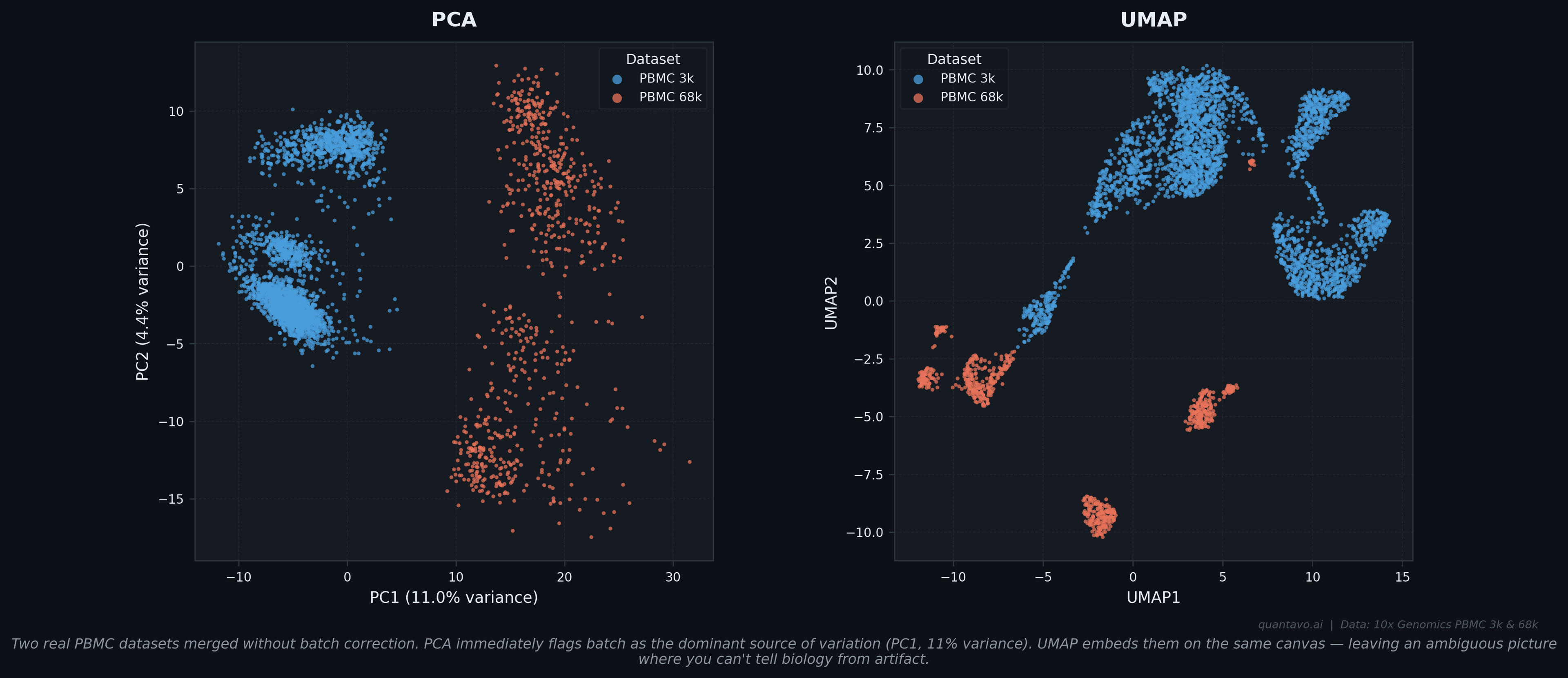
Two real PBMC datasets merged without batch correction. PCA immediately flags batch as the dominant source of variation — PC1 alone explains 11% of variance and completely separates the two datasets. UMAP embeds them on the same canvas, leaving an ambiguous picture where you cannot tell which structure is biology and which is batch artifact.
The quick-reference decision table
| What you need | Use this | Avoid this |
|---|---|---|
| First look at a new dataset | PCA | UMAP (too early) |
| Paper or talk figure | UMAP | t-SNE (slower, less global structure) |
| Input to clustering | PCA components | UMAP coordinates |
| Input to trajectory inference | Let the pipeline decide | Raw UMAP coordinates |
| Diagnosing batch effects | PCA | UMAP (gives ambiguous picture) |
| Small dataset (<500 cells) | PCA or t-SNE | UMAP (needs more data to work well) |
| Checking if two conditions differ | PCA | (UMAP is fine too, just less interpretable) |
One thing that unifies all of this
Every dimensionality reduction method is making a trade-off. PCA trades flexibility for interpretability. UMAP trades interpretability for the ability to capture complex structure. t-SNE trades speed for fine-grained local structure.
None of them are showing you your data. They are all showing you a projection of your data: a shadow cast from a high-dimensional object onto a lower-dimensional surface. The shadow is informative. The shadow is not the object.
The best analysts do not pick one method and commit to it. They run multiple methods, compare what they agree on, and get skeptical about anything that only shows up in one projection. When PCA and UMAP both agree that there are three major populations in your data, that is a robust finding. When a cluster only appears in UMAP and vanishes in PCA, that warrants investigation before it goes in the paper. Use the tools. Understand what they are showing you. Do not let the pretty picture do your thinking for you.
Series Complete: What We Covered
- Part 1 — Why your data has too many dimensions and what goes wrong in high-dimensional space
- Part 2 — How PCA works and the decisions that actually matter
- Part 3 — Why t-SNE and UMAP exist and the mistakes people make with nonlinear methods
- Part 4 — The practical decision framework for choosing the right method
Coming Up Next
The Reproducible Immunology series continues. Next up: flow cytometry compensation — what it is actually doing mathematically, why it goes wrong, and how to catch it when it does.
I'm Cory Henn, an immunologist and data scientist who helps biotech teams and academic PIs make sense of complex biological data. If you have a dataset that needs answers, I offer free 30-minute discovery calls.
Book a free 30-minute call and we will figure out the best path forward for your data.
Book a Free 30-Minute Call